<?xml version="1.0" encoding="utf-8"?><feed xmlns="http://www.w3.org/2005/Atom" ><generator uri="https://jekyllrb.com/" version="4.4.1">Jekyll</generator><link href="https://noodle-eater.github.io/feed.xml" rel="self" type="application/atom+xml" /><link href="https://noodle-eater.github.io/" rel="alternate" type="text/html" /><updated>2026-05-27T14:13:04+00:00</updated><id>https://noodle-eater.github.io/feed.xml</id><title type="html">Noodle Eater</title><subtitle>Personal site and devlog of A. Hamdani, gameplay programmer.</subtitle><author><name>A. Hamdani</name></author><entry><title type="html">Unity UI Binding Tools</title><link href="https://noodle-eater.github.io/ui-binding-unity/" rel="alternate" type="text/html" title="Unity UI Binding Tools" /><published>2022-08-15T10:00:32+00:00</published><updated>2022-08-15T10:00:32+00:00</updated><id>https://noodle-eater.github.io/ui-binding-unity</id><content type="html" xml:base="https://noodle-eater.github.io/ui-binding-unity/"><![CDATA[<h2 id="intro">Intro</h2>

<p>I’ve been using unreal for sometimes and it’s a pretty amazing engine. I found that they have <code class="language-plaintext highlighter-rouge">UPROPERTY(meta=(BindWidget))</code> to binding UI variable declaration in the C++ code and the Widget.</p>

<div class="language-cpp highlighter-rouge"><div class="highlight"><pre class="highlight"><code><span class="n">UPROPERTY</span><span class="p">(</span><span class="n">meta</span><span class="o">=</span><span class="p">(</span><span class="n">BindWidget</span><span class="p">))</span>
<span class="n">UTextBlock</span><span class="o">*</span> <span class="n">TextBlock_PlayerName</span><span class="p">;</span>
</code></pre></div></div>

<p>Unreal will bind that variable into the UI component that has the same type and name. And lately, I also see that Godot has its own binding, and they improve it in Godot 3.5. But, I do not find Unity built-in UI binding. I did not check the UI Toolkit yet or any other frameworks. So I decide to make my own binding inspired by Unreal.</p>

<h2 id="requirement">Requirement</h2>

<p>This UI binding must fulfil these criteria,</p>

<ul>
  <li>Bind UI declaration in code with the UI component in the scene.</li>
  <li>Warn the User when the binding lost its reference.</li>
</ul>

<h2 id="implementation">Implementation</h2>

<h3 id="how-to-bind">How to bind?</h3>

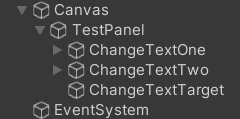
<p>C# attribute is used for binding the variable, this attribute act as a mark and later the variable with this attribute or mark can be retrieved using reflection.</p>

<p><img src="/assets/images/posts/ui-binding-unity/scene.png" alt="scene" /></p>

<h3 id="how-to-assign-the-references">How to assign the references?</h3>

<p>The UI class need to inherit from <code class="language-plaintext highlighter-rouge">CanvasUI</code> class, a base class of each UI in this framework. We need to retrieve this class instance to assign the reference to the variable of this class. Using attributes for marking this class is possible, but I want to add basic functionality to the UI, so I need to use class.</p>

<div class="language-csharp highlighter-rouge"><div class="highlight"><pre class="highlight"><code><span class="k">public</span> <span class="k">class</span> <span class="nc">TestPanelUI</span> <span class="p">:</span> <span class="n">CanvasUI</span>
<span class="p">{</span>
    <span class="p">[</span><span class="n">BindUI</span><span class="p">]</span> <span class="k">private</span> <span class="n">Button</span> <span class="n">ChangeTextOne</span><span class="p">;</span>
    <span class="p">[</span><span class="n">BindUI</span><span class="p">]</span> <span class="k">private</span> <span class="n">Button</span> <span class="n">ChangeTextTwo</span><span class="p">;</span>
    <span class="p">[</span><span class="n">BindUI</span><span class="p">]</span> <span class="k">private</span> <span class="n">TMP_Text</span> <span class="n">ChangeTextTarget</span><span class="p">;</span>
<span class="p">}</span>
</code></pre></div></div>

<h3 id="how-to-warn-broken-reference">How to warn broken reference?</h3>

<p>We want to warn the user that the reference may be broken when especially after they modify the scene, and after compiling. They may accidentally rename the GameObject or change the variable name.</p>

<p>We will listen <code class="language-plaintext highlighter-rouge">EditorApplication.hierarchyChanged</code> for scene modification and execute the code to validate the binding reference.</p>

<p>And we also use <code class="language-plaintext highlighter-rouge">DidReloadScripts</code> attribute, this will be triggered after unity recompiles its assemblies.</p>

<div class="language-csharp highlighter-rouge"><div class="highlight"><pre class="highlight"><code><span class="p">[</span><span class="n">InitializeOnLoad</span><span class="p">]</span>
<span class="k">public</span> <span class="k">static</span> <span class="k">class</span> <span class="nc">UIBindingValidator</span>
<span class="p">{</span>
    <span class="k">static</span> <span class="nf">UIBindingValidator</span><span class="p">()</span>
    <span class="p">{</span>
        <span class="n">EditorApplication</span><span class="p">.</span><span class="n">hierarchyChanged</span> <span class="p">+=</span> <span class="n">ValidateUIBinding</span><span class="p">;</span>
    <span class="p">}</span>
    
    <span class="p">[</span><span class="n">DidReloadScripts</span><span class="p">]</span>
    <span class="k">public</span> <span class="k">static</span> <span class="k">void</span> <span class="nf">ValidateUIBinding</span><span class="p">()</span>
    <span class="p">{</span>
        <span class="c1">// Validation code here</span>
    <span class="p">}</span>
<span class="p">}</span>
</code></pre></div></div>

<h3 id="why-use-reflection">Why use reflection?</h3>

<p>Normally we bind the reference in the unity editor by drag-dropping the game object into the field. This may be fine in a small scope project but in a bigger project, this may take a longer time. So, we want to do it automatically for a different types of components. We need a reflection to help us find which variable and game object we want and bind them.</p>

<h3 id="is-it-possible-not-to-use-reflection">Is it possible not to use reflection?</h3>

<p>I believe it’s possible but with many limitations. It will require a lot more setup, such as</p>

<ul>
  <li>Declare using base class.</li>
  <li>Cast the reference.</li>
  <li>Difficult to check using field name.</li>
  <li>Need to wrap the variable if needed.</li>
</ul>

<p>That’s the limitation I can think of. Reflection also does the same with the check but since we can use and check the type of field in runtime, we can find the right type and the right name for the reference.</p>

<h2 id="setup">Setup</h2>

<p>Follow the setup below to use the UI Binding in your games,</p>

<ul>
  <li>Add the <code class="language-plaintext highlighter-rouge">GameCanvasSystem</code> into a GameObject.</li>
  <li>
    <p>Create the UI class, and inherit it from <code class="language-plaintext highlighter-rouge">CanvasUI</code>.</p>

    <div class="language-csharp highlighter-rouge"><div class="highlight"><pre class="highlight"><code>  <span class="k">public</span> <span class="k">class</span> <span class="nc">TestPanelUI</span> <span class="p">:</span> <span class="n">CanvasUI</span>
  <span class="p">{</span>
    
  <span class="p">}</span>
</code></pre></div>    </div>
  </li>
  <li>Add the field you need, and make sure its name is the same as the one in the scene.</li>
  <li>
    <p>Add <code class="language-plaintext highlighter-rouge">BindUI</code> attribute into the field.</p>

    <div class="language-csharp highlighter-rouge"><div class="highlight"><pre class="highlight"><code>  <span class="k">public</span> <span class="k">class</span> <span class="nc">TestPanelUI</span> <span class="p">:</span> <span class="n">CanvasUI</span>
  <span class="p">{</span>
      <span class="p">[</span><span class="n">BindUI</span><span class="p">]</span> <span class="k">private</span> <span class="n">Button</span> <span class="n">ChangeTextOne</span><span class="p">;</span>
      <span class="p">[</span><span class="n">BindUI</span><span class="p">]</span> <span class="k">private</span> <span class="n">Button</span> <span class="n">ChangeTextTwo</span><span class="p">;</span>
      <span class="p">[</span><span class="n">BindUI</span><span class="p">]</span> <span class="k">private</span> <span class="n">TMP_Text</span> <span class="n">ChangeTextTarget</span><span class="p">;</span>
  <span class="p">}</span>
</code></pre></div>    </div>
  </li>
  <li>Press play.
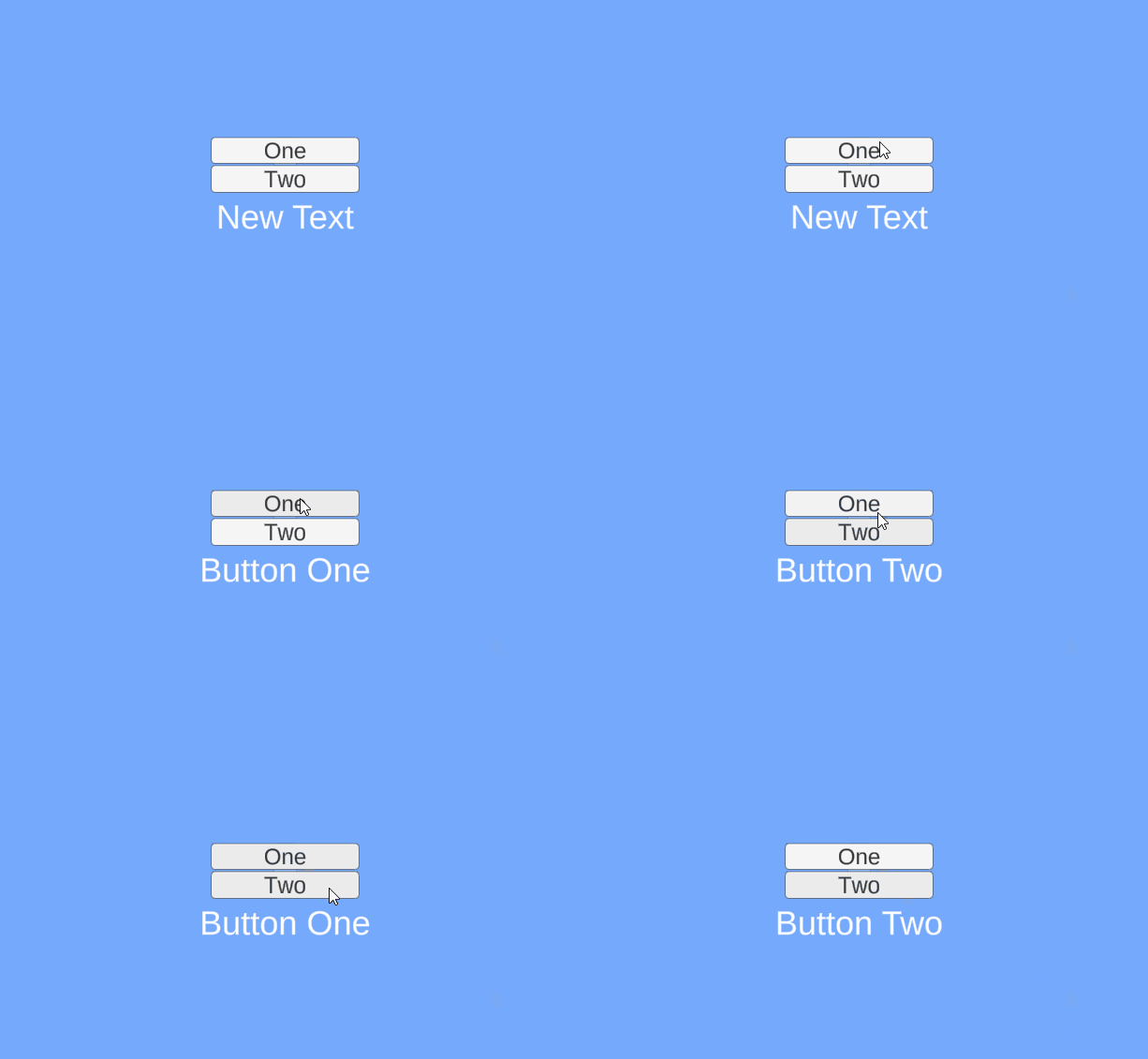
<img src="/assets/images/posts/ui-binding-unity/binding.gif" alt="binding" /></li>
</ul>

<p>You can find the project <a href="https://github.com/noodle-eater/Toolset/tree/master/Assets/Canvas">here</a>.</p>

<hr />

<p>Thank you for reading 😃 I hope you enjoy it.</p>

<p>Have a nice day.</p>]]></content><author><name>A. Hamdani</name></author><category term="tools" /><summary type="html"><![CDATA[I’ve been using unreal for sometimes and it’s a pretty amazing engine. I found that they have UPROPERTY(meta=(BindWidget)) to binding UI variable declaration in the C++ code and the Widget.]]></summary></entry><entry><title type="html">Enum Generator in Unity</title><link href="https://noodle-eater.github.io/enum-generator-in-unity/" rel="alternate" type="text/html" title="Enum Generator in Unity" /><published>2022-08-12T15:45:41+00:00</published><updated>2022-08-12T15:45:41+00:00</updated><id>https://noodle-eater.github.io/enum-generator-in-unity</id><content type="html" xml:base="https://noodle-eater.github.io/enum-generator-in-unity/"><![CDATA[<p>Do you ever think to use enum for making ID because it can be access the from code?</p>

<p>For long list of item id this is not really a good solution, but for short id this should be fine.</p>

<h2 id="scriptableobject">ScriptableObject</h2>

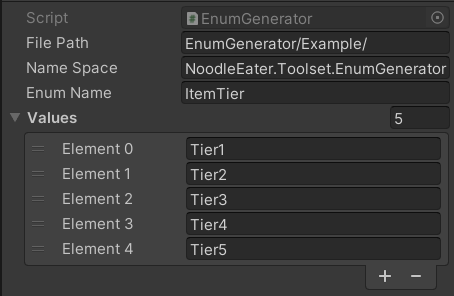
<p>ScriptableObject is used for the user interface of this generator because the user most likely wanna have more than one enum generator they can edit. In this ScriptableObject, we need to define directory, namespace, enum name and values.</p>

<p><img src="/assets/images/posts/enum-generator-in-unity/enum-so.png" alt="Untitled" /></p>

<h2 id="generator">Generator</h2>

<p>There are two ways to generate this enum,</p>

<ol>
  <li>Create a template file.</li>
  <li>Using C# CodeDom.</li>
</ol>

<p>Using CodeDom the generated code will be automatically indented and there should be no error in the indentation or spacing.</p>

<p>This code generator is also can be used for unit testing, but it’s on another level.</p>

<p>For this simple generator, we just need to create,</p>

<ul>
  <li>CodeNamespace, represent a namespace declaration.</li>
  <li>CodeTypeDeclaration, this is where we can declare enum, class, interface and struct.</li>
  <li>CodeCompileUnit, a container for the CodeDom program graph or the above variable.</li>
</ul>

<div class="language-csharp highlighter-rouge"><div class="highlight"><pre class="highlight"><code><span class="k">private</span> <span class="k">readonly</span> <span class="n">CodeNamespace</span> <span class="n">_codeNamespace</span> <span class="p">=</span> <span class="k">new</span><span class="p">();</span>
<span class="k">private</span> <span class="k">readonly</span> <span class="n">CodeTypeDeclaration</span> <span class="n">_codeTypeDeclaration</span> <span class="p">=</span> <span class="k">new</span><span class="p">();</span>
<span class="k">private</span> <span class="n">CodeCompileUnit</span> <span class="n">_codeCompileUnit</span> <span class="p">=</span> <span class="k">new</span><span class="p">();</span>

<span class="k">public</span> <span class="nf">EnumGenerationSystem</span><span class="p">()</span>
<span class="p">{</span>
    <span class="n">_codeTypeDeclaration</span><span class="p">.</span><span class="n">IsEnum</span> <span class="p">=</span> <span class="k">true</span><span class="p">;</span>
    <span class="n">_codeNamespace</span><span class="p">.</span><span class="n">Types</span><span class="p">.</span><span class="nf">Add</span><span class="p">(</span><span class="n">_codeTypeDeclaration</span><span class="p">);</span>
    <span class="n">_codeCompileUnit</span><span class="p">.</span><span class="n">Namespaces</span><span class="p">.</span><span class="nf">Add</span><span class="p">(</span><span class="n">_codeNamespace</span><span class="p">);</span>
<span class="p">}</span>
</code></pre></div></div>

<p>Use CodeMemberField to add the enum values. CodeMemberField is used to declare a field or type.</p>

<div class="language-csharp highlighter-rouge"><div class="highlight"><pre class="highlight"><code><span class="k">foreach</span> <span class="p">(</span><span class="kt">var</span> <span class="n">enumValue</span> <span class="k">in</span> <span class="n">Values</span><span class="p">)</span>
<span class="p">{</span>
    <span class="n">CodeMemberField</span> <span class="n">field</span> <span class="p">=</span> <span class="k">new</span> <span class="nf">CodeMemberField</span><span class="p">(</span><span class="n">EnumName</span><span class="p">,</span> <span class="n">enumValue</span><span class="p">);</span>
    <span class="n">_codeTypeDeclaration</span><span class="p">.</span><span class="n">Members</span><span class="p">.</span><span class="nf">Add</span><span class="p">(</span><span class="n">field</span><span class="p">);</span>
<span class="p">}</span>
</code></pre></div></div>

<p>And finally, write the code into a C# file.</p>

<div class="language-csharp highlighter-rouge"><div class="highlight"><pre class="highlight"><code><span class="n">CodeDomProvider</span> <span class="n">provider</span> <span class="p">=</span> <span class="n">CodeDomProvider</span><span class="p">.</span><span class="nf">CreateProvider</span><span class="p">(</span><span class="s">"CSharp"</span><span class="p">);</span>
<span class="n">CodeGeneratorOptions</span> <span class="n">options</span> <span class="p">=</span> <span class="k">new</span> <span class="n">CodeGeneratorOptions</span>
<span class="p">{</span>
    <span class="n">BracingStyle</span> <span class="p">=</span> <span class="s">"C"</span>
<span class="p">};</span>

<span class="k">using</span> <span class="p">(</span><span class="n">StreamWriter</span> <span class="n">sourceWriter</span> <span class="p">=</span> <span class="k">new</span> <span class="nf">StreamWriter</span><span class="p">(</span><span class="n">filePath</span><span class="p">))</span>
<span class="p">{</span>
    <span class="n">provider</span><span class="p">.</span><span class="nf">GenerateCodeFromCompileUnit</span><span class="p">(</span><span class="n">_codeCompileUnit</span><span class="p">,</span> <span class="n">sourceWriter</span><span class="p">,</span> <span class="n">options</span><span class="p">);</span>
    <span class="n">AssetDatabase</span><span class="p">.</span><span class="nf">Refresh</span><span class="p">();</span>
<span class="p">}</span>
</code></pre></div></div>

<h2 id="trigger">Trigger</h2>

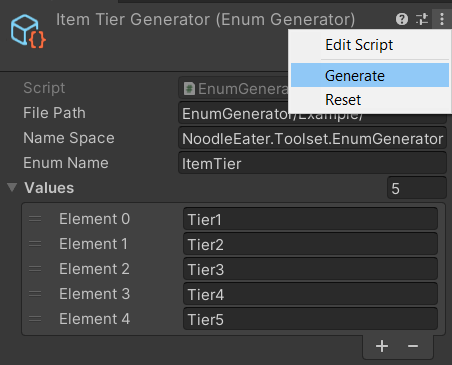
<p>For the trigger to generate the enum, we use <code class="language-plaintext highlighter-rouge">ContextMenu</code>, not pretty convenient compared to a button, but at least we can use it. Later we can update it to use a button or even a custom editor window, but I stick to ScriptableObject because this is the faster way to get the generator working.</p>

<div class="language-csharp highlighter-rouge"><div class="highlight"><pre class="highlight"><code><span class="p">[</span><span class="nf">ContextMenu</span><span class="p">(</span><span class="s">"Generate"</span><span class="p">)]</span>
<span class="k">public</span> <span class="k">void</span> <span class="nf">GenerateEnum</span><span class="p">()</span>
<span class="p">{</span>
    <span class="n">EnumGenerationSystem</span> <span class="n">enumGenerationSystem</span> <span class="p">=</span> <span class="k">new</span> <span class="n">EnumGenerationSystem</span>
    <span class="p">{</span>
        <span class="n">Namespace</span> <span class="p">=</span> <span class="n">nameSpace</span><span class="p">,</span>
        <span class="n">EnumName</span> <span class="p">=</span> <span class="n">enumName</span><span class="p">,</span>
        <span class="n">FileDirectory</span> <span class="p">=</span> <span class="n">Application</span><span class="p">.</span><span class="n">dataPath</span> <span class="p">+</span> <span class="s">"/"</span> <span class="p">+</span> <span class="n">filePath</span><span class="p">,</span>
        <span class="n">Values</span> <span class="p">=</span> <span class="n">values</span>
    <span class="p">};</span>
    
    <span class="n">enumGenerationSystem</span><span class="p">.</span><span class="nf">GenerateEnum</span><span class="p">();</span>
<span class="p">}</span>
</code></pre></div></div>

<p><img src="/assets/images/posts/enum-generator-in-unity/context-menu.png" alt="Untitled" /></p>

<h2 id="result">Result</h2>
<p>Below is the generated enum from the ScriptableObject above.</p>
<div class="language-csharp highlighter-rouge"><div class="highlight"><pre class="highlight"><code><span class="c1">//------------------------------------------------------------------------------</span>
<span class="c1">// &lt;auto-generated&gt;</span>
<span class="c1">//     This code was generated by a tool.</span>
<span class="c1">//     Runtime Version:4.0.30319.42000</span>
<span class="c1">//</span>
<span class="c1">//     Changes to this file may cause incorrect behavior and will be lost if</span>
<span class="c1">//     the code is regenerated.</span>
<span class="c1">// &lt;/auto-generated&gt;</span>
<span class="c1">//------------------------------------------------------------------------------</span>

<span class="k">namespace</span> <span class="nn">NoodleEater.Toolset.EnumGenerator</span>
<span class="p">{</span>
    
    
    <span class="k">public</span> <span class="k">enum</span> <span class="n">ItemTier</span>
    <span class="p">{</span>
        
        <span class="n">Tier1</span><span class="p">,</span>
        
        <span class="n">Tier2</span><span class="p">,</span>
        
        <span class="n">Tier3</span><span class="p">,</span>
        
        <span class="n">Tier4</span><span class="p">,</span>
        
        <span class="n">Tier5</span><span class="p">,</span>
    <span class="p">}</span>
<span class="p">}</span>
</code></pre></div></div>

<p>You can see the source code <a href="https://github.com/noodle-eater/Toolset/tree/master/Assets/EnumGenerator">here</a></p>

<hr />
<p>Thank you 😊 I hope you enjoy it.</p>]]></content><author><name>A. Hamdani</name></author><category term="tool" /><summary type="html"><![CDATA[Do you ever think to use enum for making ID because it can be access the from code?]]></summary></entry><entry><title type="html">#2 Egg Farm Update</title><link href="https://noodle-eater.github.io/devlog-02-egg-farm/" rel="alternate" type="text/html" title="#2 Egg Farm Update" /><published>2022-06-10T14:57:37+00:00</published><updated>2022-06-10T14:57:37+00:00</updated><id>https://noodle-eater.github.io/devlog-02-egg-farm</id><content type="html" xml:base="https://noodle-eater.github.io/devlog-02-egg-farm/"><![CDATA[<p>Welcome to the second update of my farming game, lately I start to lose my motivation to continue this game, I still work on the game and push my self to finish it. Writing this blog is also helping me keep working on my games, I am glad start writing this blog actually. And these are the update of the game.</p>

<h2 id="sheep">Sheep</h2>

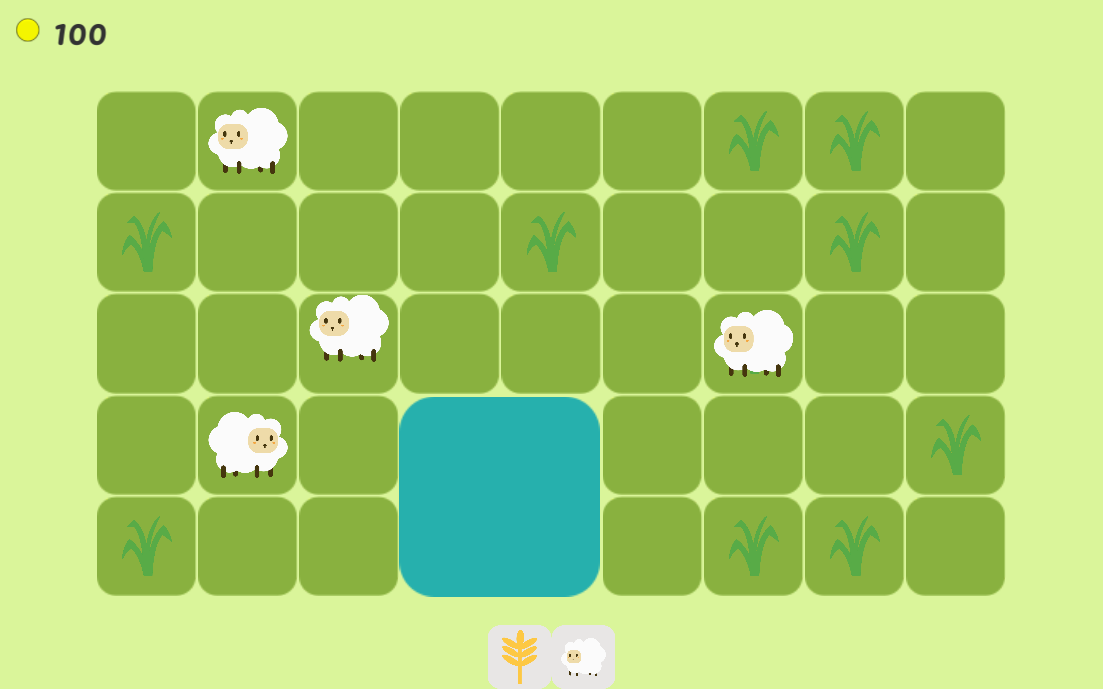
<p>Instead of putting the sheep inside a cage, I decide to let them roam in the field and search for food. This also makes me add weed to the farm, the weed gonna be eaten by sheep, and you need to pull it before planting anything.</p>

<p><img src="/assets/images/posts/devlog-02-egg-farm/sheep.png" alt="sheep.png" /></p>

<h2 id="scenario">Scenario</h2>

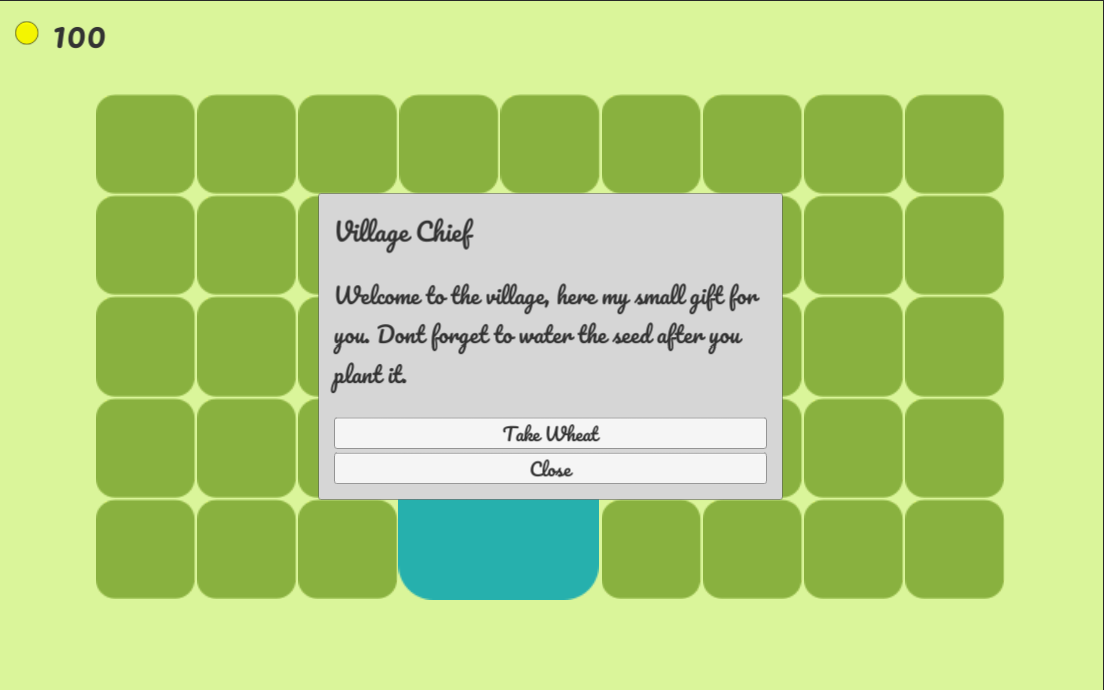
<p>For making the game have a bit of a story I add a short narrative into the game to guide the player, give the player and also add a quest for the player to finish.
The story gonna be a pretty common one, the story is you were fired from your work because of a pandemic and you take a loan to work on a farm to pay your loan and start a new life.</p>

<p><img src="/assets/images/posts/devlog-02-egg-farm/scenario.png" alt="scenario.png" /></p>

<h2 id="mail">Mail</h2>

<p>Mail is used to deliver part of the story and quest to the player.</p>

<p><img src="/assets/images/posts/devlog-02-egg-farm/mail.png" alt="mail.png" /></p>

<h2 id="ui-and-fonts">UI and Fonts</h2>

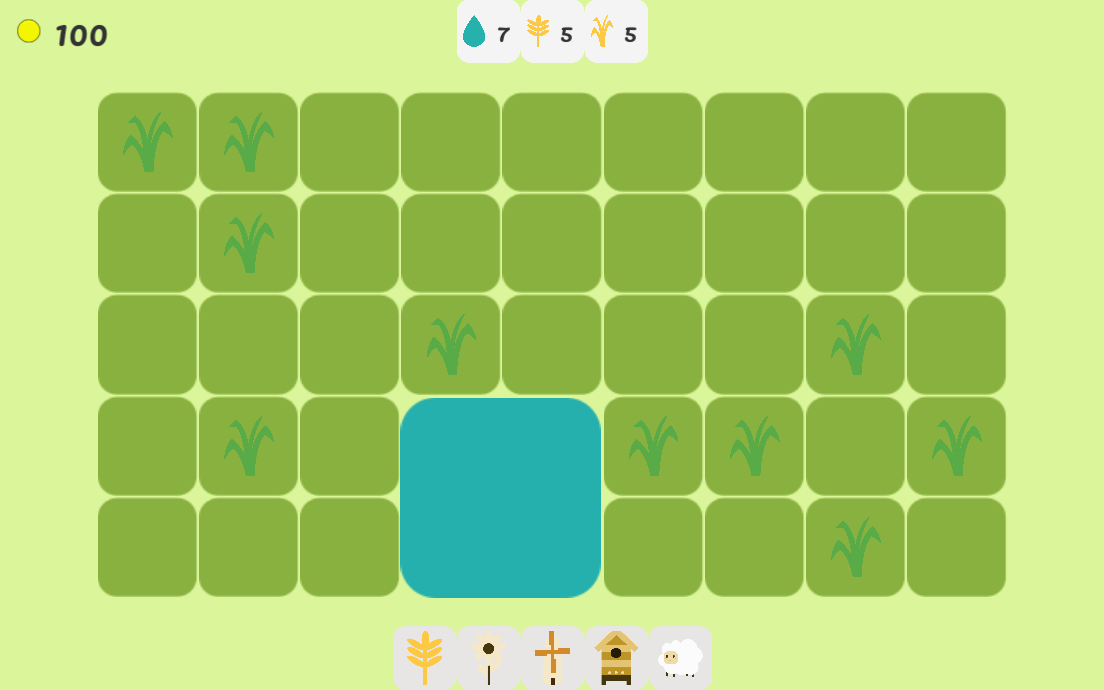
<p>I want to keep everything minimalist and not much UI, so I decide not to make a sell panel but instead use the inventory UI directly to sell the item.</p>

<ul>
  <li>UI for plant or build.</li>
  <li>Inventory UI.</li>
</ul>

<p><img src="/assets/images/posts/devlog-02-egg-farm/ui.png" alt="ui.png" /></p>

<h2 id="next-update">Next Update</h2>

<ul>
  <li>Finish current features.</li>
  <li>Polishing existing features.</li>
</ul>

<hr />
<p>Thank you 😊 I hope you enjoy it.</p>]]></content><author><name>A. Hamdani</name></author><category term="blog" /><summary type="html"><![CDATA[Welcome to the second update of my farming game, lately I start to lose my motivation to continue this game, I still work on the game and push my self to finish it. Writing this blog is also helping…]]></summary></entry><entry><title type="html">GameObject Name Redirector in Unity</title><link href="https://noodle-eater.github.io/tool-unity-gameobject-redirector/" rel="alternate" type="text/html" title="GameObject Name Redirector in Unity" /><published>2022-05-11T15:21:21+00:00</published><updated>2022-05-11T15:21:21+00:00</updated><id>https://noodle-eater.github.io/tool-unity-gameobject-redirector</id><content type="html" xml:base="https://noodle-eater.github.io/tool-unity-gameobject-redirector/"><![CDATA[<h2 id="intro">Intro</h2>

<p>A few days ago my friend stumbled across a problem because of the usage of <code class="language-plaintext highlighter-rouge">GameObject.Find</code>, it can’t find the game object because the game object was renamed. So, I thought we can have something like Unreal Engine redirector to solve this problem.</p>

<p>In Unity, There is <code class="language-plaintext highlighter-rouge">FormerlySerializedAsAttribute</code>, which is used to rename a field without losing its serialized value.</p>

<h2 id="structure">Structure</h2>

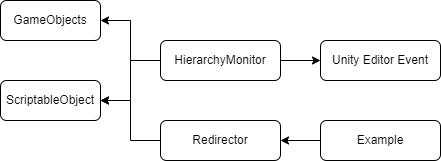
<p><img src="/assets/images/posts/tool-unity-gameobject-redirector/structure.png" alt="Experimental-Tool-Redirector.drawio.png" /></p>

<h3 id="data">Data</h3>

<ul>
  <li>
    <p>GameObjects</p>

    <p>This data comes from Unity Engine itself, to retrieve this I use</p>

    <div class="language-csharp highlighter-rouge"><div class="highlight"><pre class="highlight"><code><span class="n">Resources</span><span class="p">.</span><span class="nf">FindObjectsOfTypeAll</span><span class="p">(</span><span class="k">typeof</span><span class="p">(</span><span class="n">GameObject</span><span class="p">));</span>
</code></pre></div>    </div>
  </li>
  <li>
    <p>ScriptableObject</p>

    <p>The scriptable object is used to store all the game objects. I create a custom class to hold the required data.</p>

    <div class="language-csharp highlighter-rouge"><div class="highlight"><pre class="highlight"><code><span class="k">public</span> <span class="k">class</span> <span class="nc">NameConfig</span>
<span class="p">{</span>
    <span class="k">public</span> <span class="kt">int</span> <span class="n">hashCode</span><span class="p">;</span>
    <span class="k">public</span> <span class="kt">string</span> <span class="n">oldName</span><span class="p">;</span>
    <span class="k">public</span> <span class="kt">string</span> <span class="n">newName</span><span class="p">;</span>
<span class="p">}</span>
</code></pre></div>    </div>

    <ul>
      <li>The hash code is the game object hash code, it uses to check whether a game object name is changed or not.</li>
      <li>Old name store the current game object name.</li>
      <li>New name store the new game object name.</li>
    </ul>
  </li>
</ul>

<h3 id="system">System</h3>

<p>Since I can not find any event for rename I use <code class="language-plaintext highlighter-rouge">EditorApplication.hierarchyChanged</code>, below is the step I do to check rename in the game object.</p>

<ul>
  <li>Listen to <code class="language-plaintext highlighter-rouge">EditorApplication.hierarchyChanged</code>.</li>
  <li>When there is any change in hierarchy,</li>
  <li>Find the data that match the hash code of the current game object.</li>
  <li>If any change then stores the new name otherwise clear it.</li>
</ul>

<p>I also use a <code class="language-plaintext highlighter-rouge">MenuItem</code> to create a menu to register all the game objects manually. It will directly store the data in the ScriptableObject, I use it because working with ScriptableObject is easy and does not require any parsing.</p>

<h2 id="api">API</h2>

<p>I want to override GameObject.Find but it seems I can’t do that, so I create an extension method so it gonna looks more natural,</p>

<div class="language-csharp highlighter-rouge"><div class="highlight"><pre class="highlight"><code><span class="n">gameObject</span><span class="p">.</span><span class="nf">FindByName</span><span class="p">(</span><span class="s">"game object name"</span><span class="p">);</span>
</code></pre></div></div>

<h2 id="conclusion">Conclusion</h2>

<p>The <code class="language-plaintext highlighter-rouge">GameObject.Find</code> can be solved using redirector, but it is gonna need more improvement in the future. This experiment’s purpose is to be a proof of concept. But it gonna need more effort to make a better and more advanced version of the redirector.</p>

<h2 id="improvement">Improvement</h2>

<ul>
  <li>Make sure if the hash code is persistent, I am not testing this yet.</li>
  <li>Change ScriptableObject to store data into text-based, e.g json, csv.</li>
  <li>Asset redirector, this gonna need to connect between the redirector data and the engine itself, besides the redirector needs to be compatible with the engine too.</li>
  <li>Script Redirector, use hash code to track any changes, basically similar to this experiment.</li>
</ul>

<p>You can take a look at the code <a href="https://github.com/AmdHamdani/Redirector">here</a>.</p>

<hr />

<p>Thank you for reading 😃 I hope you enjoy it.</p>

<p>Have a nice day.</p>]]></content><author><name>A. Hamdani</name></author><category term="tool" /><summary type="html"><![CDATA[A few days ago my friend stumbled across a problem because of the usage of GameObject.Find, it can’t find the game object because the game object was renamed. So, I thought we can have something like…]]></summary></entry><entry><title type="html">#1 Egg Farm Update</title><link href="https://noodle-eater.github.io/devlog-01-egg-farm/" rel="alternate" type="text/html" title="#1 Egg Farm Update" /><published>2022-05-10T14:38:10+00:00</published><updated>2022-05-10T14:38:10+00:00</updated><id>https://noodle-eater.github.io/devlog-01-egg-farm</id><content type="html" xml:base="https://noodle-eater.github.io/devlog-01-egg-farm/"><![CDATA[<p>Welcome to the first update for Egg Farm, the game title may change in the future.</p>

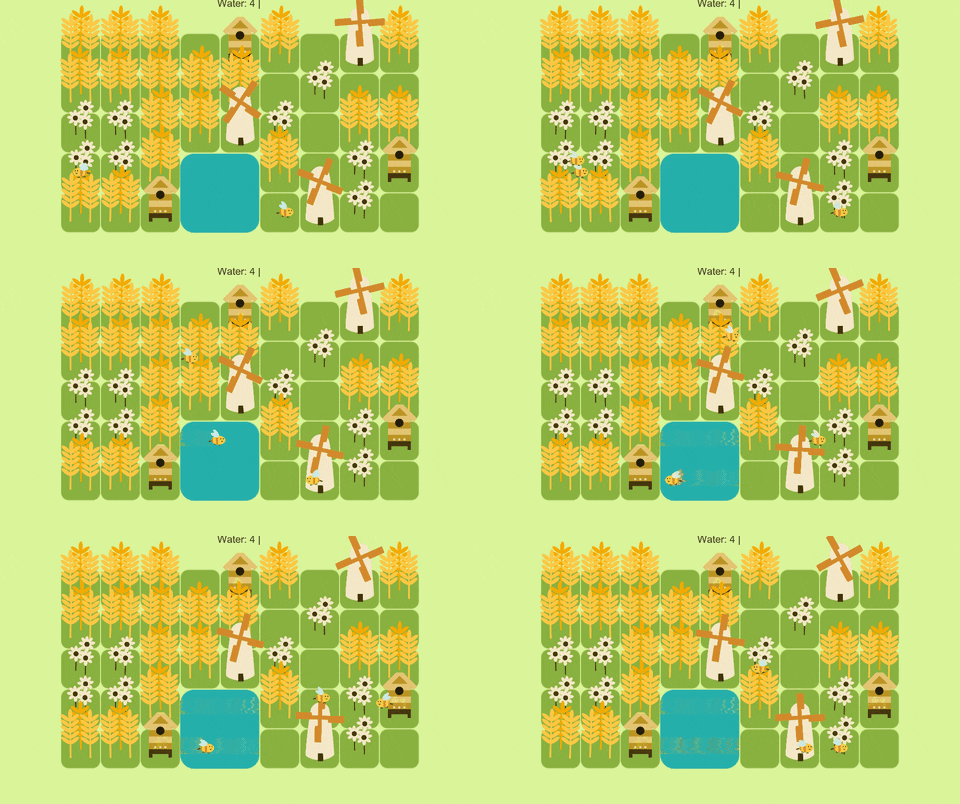
<p>Egg Farm is a relaxing mini farming game, where you can just sit and interact with everything inside the game, plant crops, and ranch animals, and design your own farm.</p>

<p>Since this is a mini-game there will not be many features existing, although I still add more features that seem fun.</p>

<p>There is still more work that needs to be done to finish this game.</p>

<p>The available features are planting, mill, and bee farm.</p>

<p><img src="https://media.giphy.com/media/2BJWtKwCWi9Zi8tjbO/giphy.gif" alt="https://media.giphy.com/media/2BJWtKwCWi9Zi8tjbO/giphy.gif" /></p>

<h2 id="planting">Planting</h2>

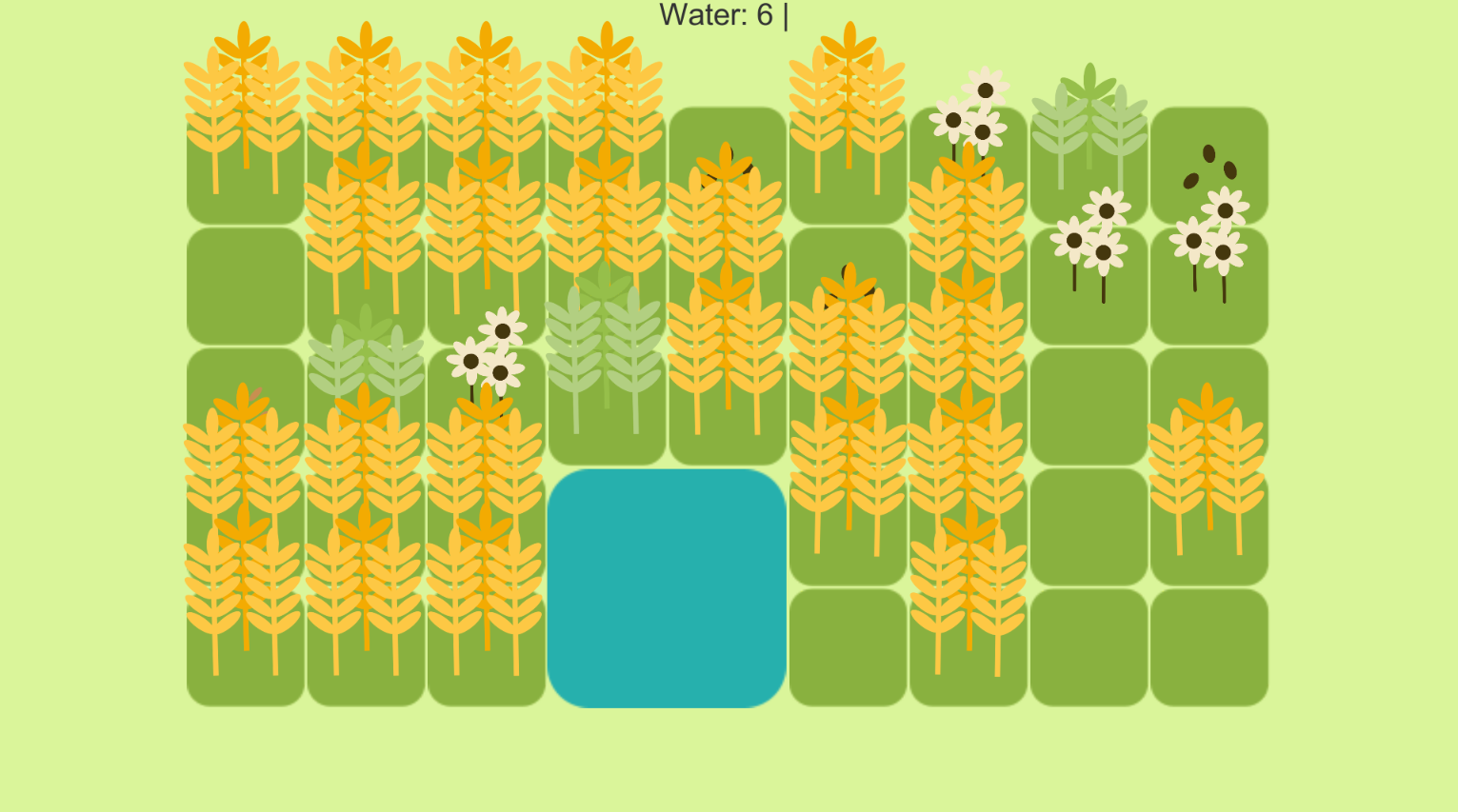
<p>Available crops are wheat and flower, you just need to plant the seed and water it. The crops gonna grow on their own after a certain time. There is no day-night cycle in this game so you just need to wait for a while.</p>

<p><img src="/assets/images/posts/devlog-01-egg-farm/plant.png" alt="plant.png" /></p>

<h2 id="mill">Mill</h2>

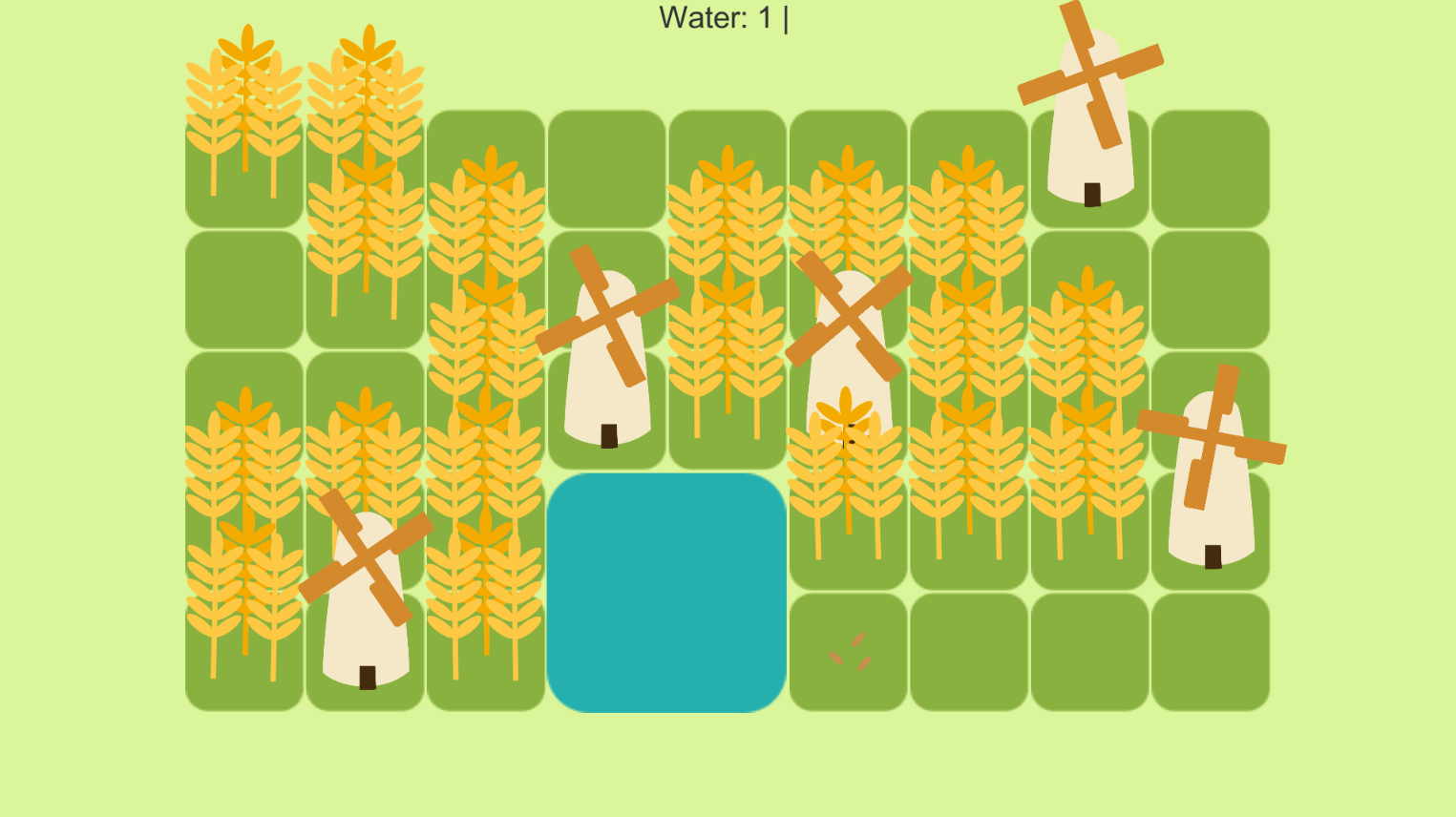
<p>Build the mill to grind wheat into flour.</p>

<p><img src="/assets/images/posts/devlog-01-egg-farm/mill.png" alt="mill.png" /></p>

<h2 id="bee-farm">Bee Farm</h2>

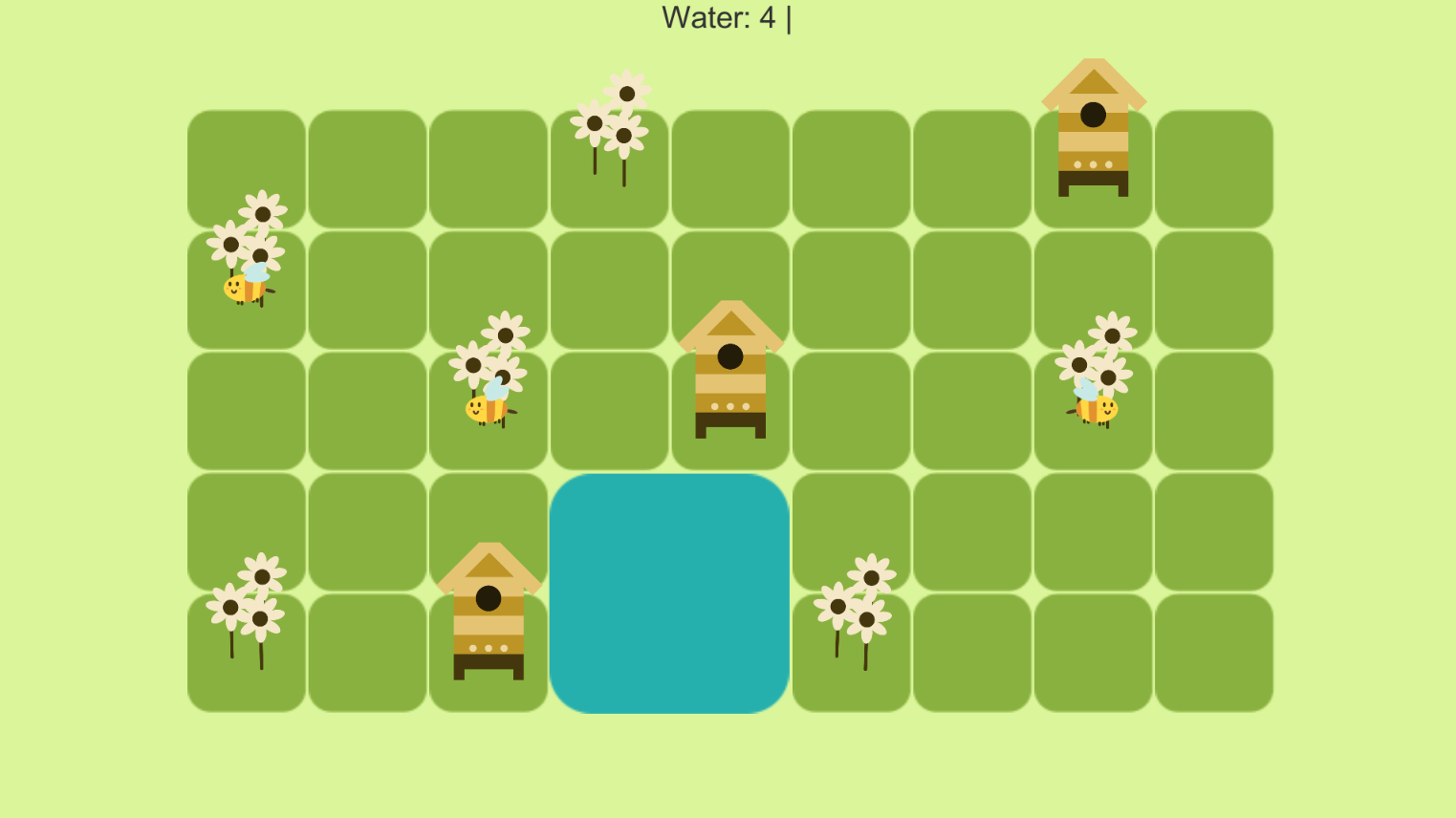
<p>Build a house for our little friends, and they will give us honey, but don’t forget to plant the flower.</p>

<p><img src="/assets/images/posts/devlog-01-egg-farm/bee.png" alt="bee.png" /></p>

<h2 id="next-update">Next Update</h2>

<ul>
  <li>Sheep ranching.</li>
</ul>

<hr />

<p>Thank you 😊 I hope you enjoy it.</p>]]></content><author><name>A. Hamdani</name></author><category term="blog" /><summary type="html"><![CDATA[Welcome to the first update for Egg Farm, the game title may change in the future.]]></summary></entry><entry><title type="html">Unreal Engine Overflow</title><link href="https://noodle-eater.github.io/ue-overflow/" rel="alternate" type="text/html" title="Unreal Engine Overflow" /><published>2022-05-06T14:42:25+00:00</published><updated>2022-05-06T14:42:25+00:00</updated><id>https://noodle-eater.github.io/ue-overflow</id><content type="html" xml:base="https://noodle-eater.github.io/ue-overflow/"><![CDATA[<p>Recently, I start using Unreal Engine to develop games. I did not have proper C++ or Unreal Engine knowledge, I usually use Unity and C#. While learning and using it, I stumbled across some problems. So I decide to make some notes that I can use and share with others.</p>

<hr />

<h3 id="print-enum-into-fstring">Print <code class="language-plaintext highlighter-rouge">Enum</code> Into <code class="language-plaintext highlighter-rouge">FString</code></h3>

<div class="language-cpp highlighter-rouge"><div class="highlight"><pre class="highlight"><code><span class="n">StaticEnum</span><span class="o">&lt;</span><span class="n">ENUM_TYPE</span><span class="o">&gt;</span><span class="p">()</span><span class="o">-&gt;</span><span class="n">GetValueAsString</span><span class="p">(</span><span class="n">ENUM_VALUE</span><span class="p">)</span>
</code></pre></div></div>

<h3 id="format-ftext">Format <code class="language-plaintext highlighter-rouge">FText</code></h3>

<div class="language-cpp highlighter-rouge"><div class="highlight"><pre class="highlight"><code><span class="n">FText</span> <span class="n">format</span> <span class="o">=</span> <span class="s">"Item Name: {ItemName}"</span>
<span class="k">const</span> <span class="n">FText</span> <span class="n">formattedText</span> <span class="o">=</span> <span class="n">FText</span><span class="o">::</span><span class="n">FormatNamed</span><span class="p">(</span><span class="n">FTextFormat</span><span class="p">(</span><span class="n">format</span><span class="p">),</span> <span class="n">TEXT</span><span class="p">(</span><span class="s">"ItemName"</span><span class="p">),</span> <span class="n">itemName</span><span class="p">);</span>
</code></pre></div></div>

<h3 id="loop-udatatable">Loop <code class="language-plaintext highlighter-rouge">UDataTable</code></h3>

<div class="language-cpp highlighter-rouge"><div class="highlight"><pre class="highlight"><code><span class="n">itemDT</span><span class="o">-&gt;</span><span class="n">ForeachRow</span><span class="o">&lt;</span><span class="n">FItemInfo</span><span class="o">&gt;</span><span class="p">(</span><span class="s">"FindItem"</span><span class="p">,</span> <span class="p">[</span><span class="o">&amp;</span><span class="p">](</span><span class="k">const</span> <span class="n">FName</span><span class="o">&amp;</span> <span class="n">key</span><span class="p">,</span> <span class="k">const</span> <span class="n">FItemInfo</span><span class="o">&amp;</span> <span class="n">item</span><span class="p">)</span> <span class="p">{</span>
    <span class="c1">// Do something here</span>
<span class="p">});</span>
</code></pre></div></div>

<h3 id="find-a-row-in-udatatable">Find a Row in <code class="language-plaintext highlighter-rouge">UDataTable</code></h3>

<div class="language-cpp highlighter-rouge"><div class="highlight"><pre class="highlight"><code><span class="n">FItemInfo</span><span class="o">*</span> <span class="n">itemInfo</span> <span class="o">=</span> <span class="n">itemDT</span><span class="o">-&gt;</span><span class="n">FindRow</span><span class="o">&lt;</span><span class="n">FItemInfo</span><span class="o">&gt;</span><span class="p">(</span><span class="n">ROW_NAME</span><span class="p">,</span> <span class="s">"FindItem"</span><span class="p">);</span>
</code></pre></div></div>

<h3 id="create-uobject-instance">Create <code class="language-plaintext highlighter-rouge">UObject</code> Instance</h3>

<div class="language-cpp highlighter-rouge"><div class="highlight"><pre class="highlight"><code><span class="n">UTextBlock</span><span class="o">*</span> <span class="n">text</span> <span class="o">=</span> <span class="n">NewObject</span><span class="o">&lt;</span><span class="n">UTextBlock</span><span class="o">&gt;</span><span class="p">(</span><span class="n">btn</span><span class="p">,</span> <span class="n">FName</span><span class="p">(</span><span class="s">"text"</span><span class="p">));</span>
</code></pre></div></div>

<h3 id="hide-field-on-certain-condition">Hide Field on Certain Condition</h3>

<div class="language-cpp highlighter-rouge"><div class="highlight"><pre class="highlight"><code><span class="n">UPROPERTY</span><span class="p">(</span><span class="n">EditAnywhere</span><span class="p">,</span> <span class="n">meta</span><span class="o">=</span><span class="p">(</span><span class="n">Condition</span><span class="o">=</span><span class="s">"YOUR_CONDITION"</span><span class="p">,</span> <span class="n">EditConditionHides</span><span class="p">))</span>
<span class="kt">float</span> <span class="n">speed</span><span class="p">;</span>
</code></pre></div></div>

<h3 id="create-min-max-slider-for-field">Create Min Max Slider for Field</h3>

<div class="language-cpp highlighter-rouge"><div class="highlight"><pre class="highlight"><code><span class="n">UPROPERTY</span><span class="p">(</span><span class="n">EditAnywhere</span><span class="p">,</span> <span class="n">meta</span> <span class="o">=</span> <span class="p">(</span><span class="n">ClampMin</span> <span class="o">=</span> <span class="s">"1"</span><span class="p">,</span> <span class="n">ClampMax</span> <span class="o">=</span> <span class="s">"10"</span><span class="p">))</span>
<span class="n">int32</span> <span class="n">totalSpawned</span><span class="p">;</span>
</code></pre></div></div>

<h3 id="instantiate-a-uobjectblueprintwbp">Instantiate a UObject/Blueprint/WBP</h3>

<div class="language-cpp highlighter-rouge"><div class="highlight"><pre class="highlight"><code><span class="n">MyClass</span><span class="o">*</span> <span class="n">instance</span> <span class="o">=</span> <span class="n">NewObject</span><span class="o">&lt;</span><span class="n">MyClass</span><span class="o">&gt;</span><span class="p">();</span>

<span class="n">UPROPERTY</span><span class="p">(</span><span class="n">EditDefaultsOnly</span><span class="p">,</span> <span class="n">BlueprintReadWrite</span><span class="p">)</span>
<span class="n">TSubclassOf</span><span class="o">&lt;</span><span class="n">MyClass</span><span class="o">&gt;</span> <span class="n">MyClassType</span><span class="p">;</span>

<span class="c1">// UObject Subclass</span>
<span class="n">NewObject</span><span class="o">&lt;</span><span class="n">ActorClass</span><span class="o">&gt;</span><span class="p">(</span><span class="n">MyClassType</span><span class="p">);</span>

<span class="c1">// Actor Subclass</span>
<span class="n">GetWorld</span><span class="p">()</span><span class="o">-&gt;</span><span class="n">SpawnActor</span><span class="o">&lt;</span><span class="n">ActorClass</span><span class="o">&gt;</span><span class="p">(</span><span class="n">MyClassType</span><span class="p">);</span>

<span class="c1">// Widget Subclass</span>
<span class="n">MyWidget</span><span class="o">*</span> <span class="n">widget</span> <span class="o">=</span> <span class="n">CreateWidget</span><span class="o">&lt;</span><span class="n">MyWidget</span><span class="o">&gt;</span><span class="p">(</span><span class="k">this</span><span class="p">,</span> <span class="n">MyWidgetType</span><span class="p">);</span>
</code></pre></div></div>

<hr />

<p>The code above is not tested and is used for reference only.</p>

<p>I hope it will be helpful</p>

<p>Cheers 😊</p>]]></content><author><name>A. Hamdani</name></author><category term="blog" /><summary type="html"><![CDATA[Recently, I start using Unreal Engine to develop games. I did not have proper C++ or Unreal Engine knowledge, I usually use Unity and C#. While learning and using it, I stumbled across some problems.…]]></summary></entry><entry><title type="html">Unity Automatic Localization System</title><link href="https://noodle-eater.github.io/unity-automatic-localization-system/" rel="alternate" type="text/html" title="Unity Automatic Localization System" /><published>2022-05-01T17:01:43+00:00</published><updated>2022-05-01T17:01:43+00:00</updated><id>https://noodle-eater.github.io/unity-automatic-localization-system</id><content type="html" xml:base="https://noodle-eater.github.io/unity-automatic-localization-system/"><![CDATA[<p>Previously I made a game using Unity3D with my friends where we need to handle localization sent by the server. while my friends focus on working with the game design, I deal with the localization. I show up with some ideas but I found all of them is not suitable, because the game has many texts inside to be found one by one. We need to store the text into a JSON file, we can write it again one by one into the JSON file, but it will take a while.</p>

<p>I came up with two approaches.</p>

<h2 id="enum-based-localization">Enum Based Localization</h2>

<p>Because I did not have much time to make fancy tools for the localization, I decide to create a ScriptableObject to hold the localization data when the game is in the prototype phase. I use the dummy quest text I use for testing.</p>

<p>I assign the text one by one and add a key for the JSON, then export it into a JSON file. Besides export into JSON files, I also generate enum files using <a href="https://docs.microsoft.com/en-us/dotnet/framework/reflection-and-codedom/using-the-codedom">C# CodeDom</a>. I choose to use enum because using string to get a value from the dictionary is prone to typo and will cause an error.</p>

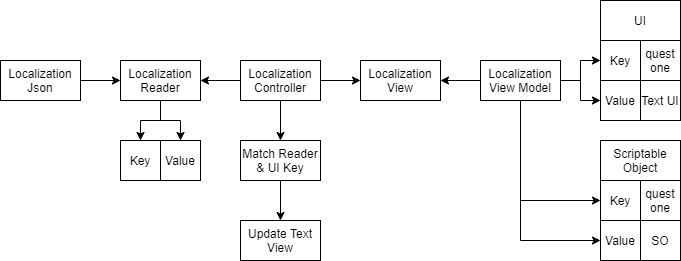
<p>But as time pass and the game get more content, I figure out that this kind of system is not good, because we have many texts and the enum will get bigger too. And also because the texts are scattered in ScriptableObject, Scripts, GameObject.</p>

<p><img src="/assets/images/posts/unity-automatic-localization-system/Piscik-Flow.png" alt="Piscik-Flow.png" /></p>

<p>I evaluated again my localization system design and found that this system design diagram is complicated. I thought of other approach and each time I come with an approach, I create another diagram to figure it how the system will look like, how they will interact with each other, how complex the system, and is it meet our need or not.</p>

<h3 id="pros">Pros</h3>

<ul>
  <li>Accessing the localization will be easier when the text amount is small.</li>
  <li>You can specify the key yourself.</li>
  <li>There should be no repetitive text in your localization.</li>
  <li>You have more control over which text you want to include in your localization.</li>
</ul>

<h3 id="cons">Cons</h3>

<ul>
  <li>The system design is pretty complex (I believe it can be made simpler).</li>
  <li>You need to specify set up more keys when game text grows.</li>
  <li>The enum will get bigger and hard to navigate when you do not know what you want to use.</li>
  <li>You need to add a localization component script yourself.</li>
</ul>

<h2 id="hashcode-based-localization"><strong>**HashCode Based Localization</strong>**</h2>

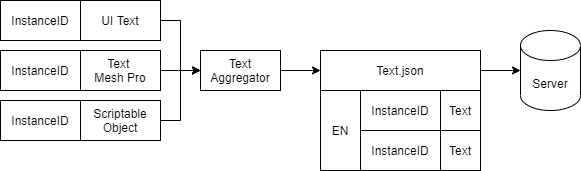
<p>Our time got more strict, We do not have much more time to find, drag and drop all the localization. I decide to use the Hash Code provided in Unity API. The hash code of the text will be taken as the key in JSON. The game itself changes from using UI Text into Text Mesh Pro because we need Text Mesh Pro features. Before diving into code, I made a diagram for the system that looks a lot simpler than the previous one.</p>

<p><img src="/assets/images/posts/unity-automatic-localization-system/Piscik-Page-2.png" alt="Piscik-Page-2.png" /></p>

<p>I collected all the Text Mesh Pro components in the scene using <code class="language-plaintext highlighter-rouge">Resources.FindObjectsOfTypeAll</code>
and write it into a JSON file, I do a similar thing for the scriptable object too, but I just drag and drop the ScriptableObject into the list in the editor and write it into JSON.</p>

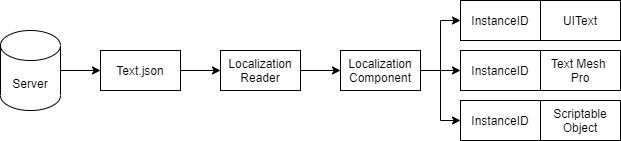
<p>The localization files consist of a hash code of the text for its key and the text itself is the value. The game will get the localization JSON from the server. I attach the Localization Component script into each GameObject that has Text Mesh Pro. It will directly replace the Text Mesh Pro string text with the localized text using the hash code from the text in the UI.</p>

<p><img src="/assets/images/posts/unity-automatic-localization-system/Piscik-Page-2-1.png" alt="Piscik-Page-2-1.png" /></p>

<h3 id="pros-1">Pros</h3>

<ul>
  <li>Fast, I do not need to set up the localization key and value, the system will automatically find it and write it into JSON.</li>
  <li>The localization component script is automatically attached by the system to each game object that has Text Mesh Pro.</li>
</ul>

<h3 id="cons-1">Cons</h3>

<ul>
  <li>The key is not readable because it uses Hash Code.</li>
  <li>There will be similar localization that you can’t delete because it belongs to a different Instance ID.</li>
</ul>

<h2 id="why-not-use-existing-tools">Why not Use Existing Tools?</h2>

<p>To be honest, I never search in the unity asset store for localization but I just knew about <a href="https://assetstore.unity.com/packages/tools/localization/i2-localization-14884">I2 Localization</a> from my friends. It looks like a pretty interesting and awesome localization tool, I also knew that unity is developing its <a href="https://docs.unity3d.com/Packages/com.unity.localization@0.5/manual/QuickStartGuide.html">localization system</a>.</p>

<p>I did not use it because I was afraid it does not meet our needs and we need time to learn it or make it meet our needs if it’s not. And when I make my own localization system I design it exactly for my games, not for general usage.</p>

<p>But after I take a look again at the diagram, I still can use this kind of system in my future game, after some polishing and optimization. This also helps me gain more experience in designing a modular system.</p>

<hr />

<p>Thank you for reading my writing, I hope this is helpful.</p>

<p>Have a nice day :)</p>]]></content><author><name>A. Hamdani</name></author><category term="tool" /><summary type="html"><![CDATA[Previously I made a game using Unity3D with my friends where we need to handle localization sent by the server. while my friends focus on working with the game design, I deal with the localization. I…]]></summary></entry><entry><title type="html">Smart Framework</title><link href="https://noodle-eater.github.io/smart-framework/" rel="alternate" type="text/html" title="Smart Framework" /><published>2021-04-21T00:00:00+00:00</published><updated>2021-04-21T00:00:00+00:00</updated><id>https://noodle-eater.github.io/smart-framework</id><content type="html" xml:base="https://noodle-eater.github.io/smart-framework/"><![CDATA[<p>I believe all of us have a goal to achieve in life. but sometimes it just feels hard to achieve and we do not know where we should start.</p>

<p>I want to develop and publish my own games but as time pass, I feel pretty lazy, tired especially after work. I usually work on my games in my free times.</p>

<p>Last year, my senior told me about Smart Framework, I read about it but I failed to really understand it. Because the article I read that time is not pretty clear and to the point for me. But today in the meeting we talk about Smart Framework and I got more understanding of that framework.</p>

<p>Smart stands for <strong>S</strong>pecific, <strong>M</strong>easureable, <strong>A</strong>ccountable, <strong>R</strong>ealistic, <strong>T</strong>ime-bound.</p>

<h3 id="specific">Specific</h3>

<blockquote>
  <p>Define the What (Output, Outcome, Expected Result) and How to achieve it.</p>
</blockquote>

<p>When developed an educational game for an educational game portal, the output I expected from the game was playable and ready to be submitted into the portal to be reviewed.</p>

<p>How I can achieve this? I will work on the game programming and the game design and art I will ask my friend to work on it. And for the sounds, we will search free to use for commercial audio.</p>

<h3 id="measurable">Measurable</h3>

<blockquote>
  <p>Define how to measure progress, the definition of done and acceptance criteria.</p>
</blockquote>

<p>The definition of done from my game is when I have a playable game so I can submit my game.</p>

<p>Since I made this game for an educational portal, the acceptance criteria will be when my game is accepted and it performs well in that portal and generate a good amount of revenue.</p>

<p>And I separate the game into a smaller milestones, prototype, MVP, test, release to help me measure the progress.</p>

<h3 id="accountable">Accountable</h3>

<blockquote>
  <p>Define to whom you can delegate the goal.</p>
</blockquote>

<p>You can delegate it not only to a person but to third-party services or other things too that can help you achieve your goal.</p>

<p>e.g when you need analytics in your game, you can use firebase analytics. Or you need history references for your history games, you can buy a history book or ask your friends that love history.</p>

<p>In my game, I am responsible for game programming.</p>

<p>Game design and art will be my friends.</p>

<p>The game audio will be free for commercial use audio.</p>

<h3 id="realistic">Realistic</h3>

<blockquote>
  <p>Make your goal align with your time and resources.</p>
</blockquote>

<p>You should understand, how much time and resources you have.</p>

<p>When I worked on my educational game, my resources are 2 people with a time of 3 months. I worked on programming while my friends were in art and design. Since we only have 3 months to finish the game and I only work on it in my free time, we make the game scope smaller and pick the easiest mechanics we can implement.</p>

<p>The end product is considered mini-games since there is not much gameplay there. If we want to add more content or make a bigger game we will need more time or more people to work on it.</p>

<p>When you have a friend that working full time on his casual game and takes 3 months to finish it. You need to allocate more time when you work on a similar casual game but in your free time. A similar game scope can take different times to achieve depending on resources and time.</p>

<h3 id="time-bound">Time-Bound</h3>

<blockquote>
  <p>Set the deadline for you goal.</p>
</blockquote>

<p>You should give a deadline to your goal, to keep you stay motivated so you can understand if this goal is possible or not with your current time-bound. So you can adjust your resources, time, and the goal itself.</p>

<p>In my games, we use the deadline from the game portal which is 3 months to work on the game, make the scope small enough so you can finish it on time.</p>

<hr />

<p>Thank you for reading this far, you are awesome.</p>

<p>I hope it will helpful for you.</p>

<p>Have a nice day :)</p>]]></content><author><name>A. Hamdani</name></author><category term="productivity" /><summary type="html"><![CDATA[I believe all of us have a goal to achieve in life. but sometimes it just feels hard to achieve and we do not know where we should start.]]></summary></entry><entry><title type="html">User Experience for Tools Development</title><link href="https://noodle-eater.github.io/ux-for-tools-programmer/" rel="alternate" type="text/html" title="User Experience for Tools Development" /><published>2020-06-09T00:00:00+00:00</published><updated>2020-06-09T00:00:00+00:00</updated><id>https://noodle-eater.github.io/ux-for-tools-programmer</id><content type="html" xml:base="https://noodle-eater.github.io/ux-for-tools-programmer/"><![CDATA[<p>Recently I learn a book about “<a href="https://www.crcpress.com/Designing-the-User-Experience-of-Game-Development-Tools/Lightbown/p/book/9781482240191">Designing the User Experience of Game Development Tools</a>”, the book is pretty straightforward and easy to understand. As a tools programmer, this is a book that I must read, to make my tools better.</p>

<p><strong>What is User Experience?</strong></p>

<p>There are many definitions of user experience. The popular one is from Elizabeth Sanders,</p>

<blockquote>
  <p>Tools need to be, “Useful, Usable and Desireable”</p>
</blockquote>

<p><strong>A. Useful</strong></p>

<p>The tool you make must fulfil user needs, or it will be useless. Ideally, these needs come from users &amp; stakeholders. Before creating your tools, you must know what your user &amp; stakeholder needs, not what they want. You need to separate which one is needs &amp; desire. Otherwise, you will have a bunch of tasks that you need to finish and it will make the development time longer.</p>

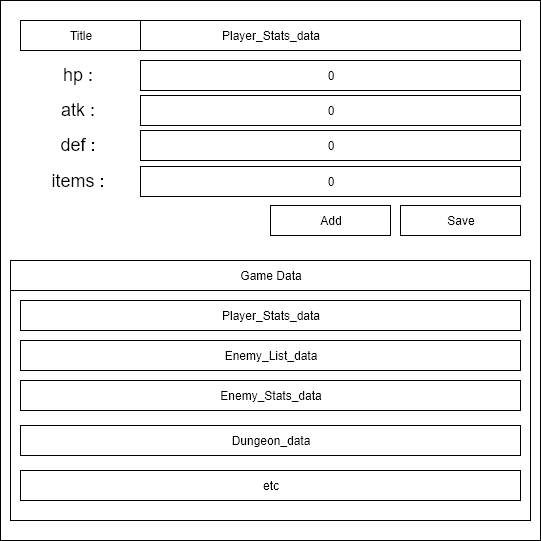
<p>Let say that our studio needs a tool to manage data of the game in development. You inspect the developer activities, ask their needs and talk with the stakeholder. And you got this list of user stories.</p>

<ul>
  <li>As a user, I want to be able to inspect the save data.</li>
  <li>As a user, I want to be able to change the data from the admin panel.</li>
  <li>As a user, I want to export the save data into a different format.</li>
  <li>As a user, I want to manipulate the game saved data.</li>
  <li>As a user, I want to change the save data in runtime.</li>
</ul>

<p>We need to decide which one will be the needs &amp; desire if you do all at once you will not ship your tools. Not at a short time at least, but your studio need the tools as soon as possible.</p>

<p>After discussion with the tools team, we decide that these are the needs. Why these? First, our tools need to show the user all the save data that the game has, otherwise it will be pointless to add more functionality when they even do not know the data. And we can provide them with functionality to manipulate the data.</p>

<ul>
  <li>As a user, I want to be able to inspect the save data.</li>
  <li>As a user, I want to manipulate the game saved data.</li>
</ul>

<p>Why we do not choose these? this feature is awesome but we still do not need it. especially for exporting the data in a different format, I think we must standardize our save data rather that support many formats since it will give a burden when maintaining it in the future. Changing save data from admin panel will be a good feature when our game is live so we can update our game from the admin panel without the need to rebuild the game. But because we are still in the development phase, we can save this for next. Save data in runtime is also a good feature especially for QA so they can easily test the game, but this feature is not needed yet now.</p>

<ul>
  <li>As a user, I want to be able to change the data from the admin panel.</li>
  <li>As a user, I want to export the save data into a different format.</li>
  <li>As a user, I want to change the save data in runtime.</li>
</ul>

<p>After a few days working on the main functionality, you finally come up with the basic version of your inspection tool. Now in the sprint review, you can show this and you can proud of it because you make it. And at the end of the sprint, you can ship your product to your user. And waiting for their feedback while improving the current Inspector Tool.</p>

<p><img src="/assets/images/posts/ux-for-tools-programmer/useful.png" alt="useful.png" /></p>

<p><strong>B. Usable</strong></p>

<p>There are many definitions of usability, these definitions include a question such as.</p>

<ul>
  <li>
    <p>How efficient is it to use?</p>
  </li>
  <li>
    <p>How easy is it to learn?</p>
  </li>
  <li>How well is the user protected from making mistakes?</li>
  <li>How satisfying is it to use?</li>
</ul>

<p>In my opinion, usability itself is</p>

<blockquote>
  <p>Making our tool easy to use by user &amp; reduce the chance of mistakes that happen when using the tool.</p>
</blockquote>

<p>After release your Inspector Tool you get some feedback from programmer in your company that use the tool.</p>

<ul>
  <li>This tool help me inspect the game data &amp; I do not need to print everything</li>
  <li>The game getting error after I update some value</li>
  <li>I got confused, the list below the save button is the list of data?</li>
</ul>

<p>Our tool already meets the needs of our user but it still not usable yet, we know it from our user feedback. First, we need to analyze the feedback and understand why this is happening.</p>

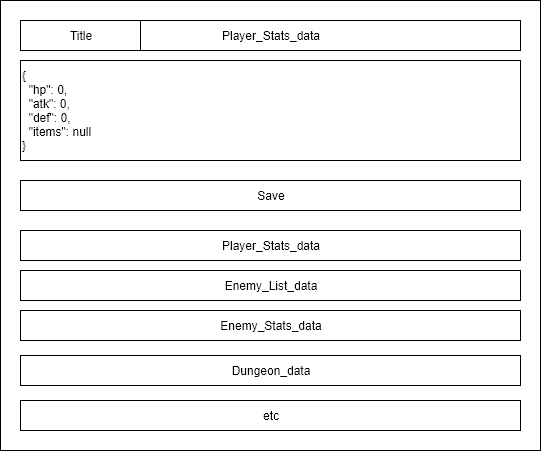
<p>In the feedback, we know that the user gets some error when updating the value since we are dealing with JSON file. There is a probability the user write wrong JSON syntax. Rather than show all the JSON, we can create some field that will hold the JSON data. And to make use do not confuse with the list of JSON, we can create a box area and give it a title. And we can update our Inspector Tool.</p>

<p><img src="/assets/images/posts/ux-for-tools-programmer/usable.png" alt="usable.png" /></p>

<p><strong>C. Desireable</strong></p>

<p>The last aspect that usually feels not important or does not contribute enough to UX. However, a tool that has good aesthetic &amp; appealing design contributes not only to user satisfaction but also will make the user believe that the designer has taken their time to create a high-quality, professional tool and make the user more confidence in using it.</p>

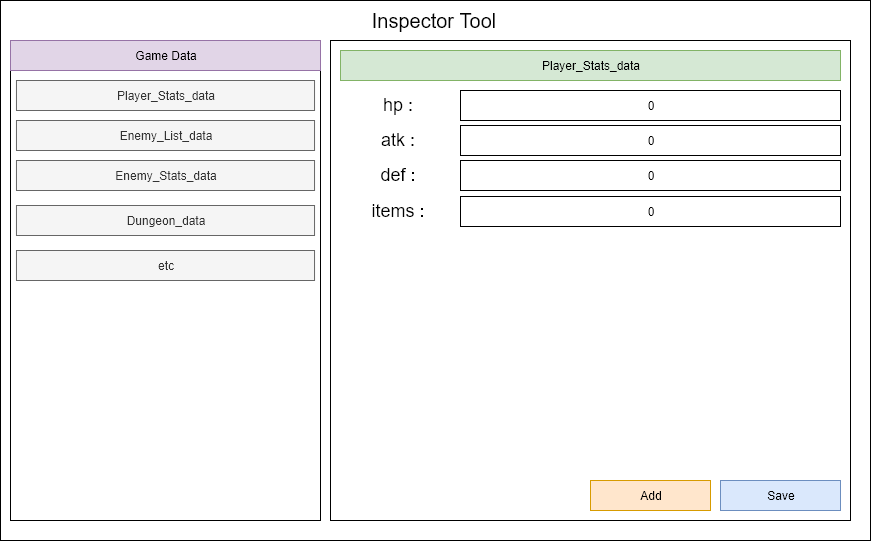
<p>To make our Inspector Tool more desireable, we can change the design of our tool and make it more eye-catching. We can separate our list of data into the left side and the right side for updating the data. Do not forget to add some good UI &amp; colour for the tools.</p>

<p><img src="/assets/images/posts/ux-for-tools-programmer/desireable.png" alt="desireable.png" /></p>

<p><strong>Being “More Human”</strong></p>

<p>The tool you make must resemble interaction with a good friend, and bad tools will make you interact with frustrating people and it will make you piss off.</p>

<blockquote>
  <p>Create a tool that can be a good friend for user, so they will use it because they need it. Not because they do not have any choice.</p>
</blockquote>

<hr />

<p>Thank you for reading this far :) hope you gain more knowledge.</p>

<p>And have a good day.</p>]]></content><author><name>A. Hamdani</name></author><category term="tool" /><summary type="html"><![CDATA[Recently I learn a book about “Designing the User Experience of Game Development Tools”, the book is pretty straightforward and easy to understand. As a tools programmer, this is a book that I must…]]></summary></entry><entry><title type="html">Create in Game Console for Unity</title><link href="https://noodle-eater.github.io/create-in-game-console-for-unity/" rel="alternate" type="text/html" title="Create in Game Console for Unity" /><published>2020-01-23T00:00:00+00:00</published><updated>2020-01-23T00:00:00+00:00</updated><id>https://noodle-eater.github.io/create-in-game-console-for-unity</id><content type="html" xml:base="https://noodle-eater.github.io/create-in-game-console-for-unity/"><![CDATA[<h1 id="intro">Intro</h1>

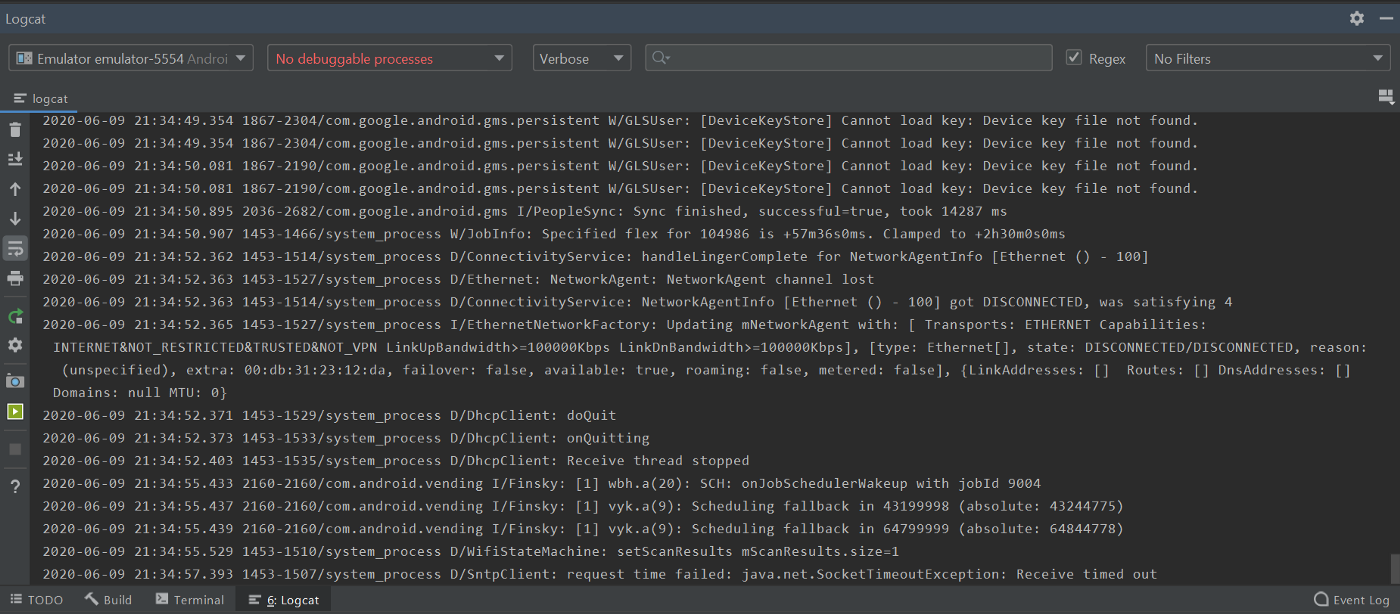
<p>When you working on your game, you also want to debug, know the process of your game, take a look at the log you create for that game. It’s easy to take a look at the log in the game engine or framework, but how if I wanna look the log from the game when it already becomes executable files e.g .exe, .apk etc.</p>

<p>In Android, you can open a terminal and show the log cat but the experience is painful since it shows all the log from your android device too, or you can open android studio and take a look at the log cat there, but sometimes we do not need all the log from our device. We only need a specific log from the game. Or maybe simply because of the Laptop/PC is reached its limit so we can not open android studio.</p>

<p><img src="/assets/images/posts/create-in-game-console-for-unity/android-log.png" alt="Android-Console" /></p>

<p>At this point, we can have an in-game debug console for our games and it will be better for us if we can use it across our game. So we can reduce the time for us to make another debug console.</p>

<p>I will use unity in here, you can do the same idea in other frameworks/engine. In the Unity Asset Store. you can find some free and ready to use the in-game console. But my goal writing this is, I want to explore and learn how we can create our own in-game console that will fit our need. And sometimes I found my self repeating the same task when testing third-party, and it will be better when I can have debugger to help me test the third-party.</p>

<h1 id="design">Design</h1>

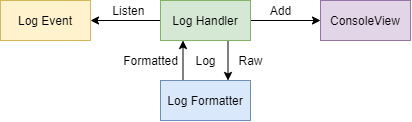
<p>The goal of the in-game console is simply displaying log from the game to us in game runtime. We need to listen to the <code class="language-plaintext highlighter-rouge">Log Event</code>, so each time the game is logging something we will be notified. And the log will be handled by <code class="language-plaintext highlighter-rouge">Log Handler</code> . The raw log will be formatted by <code class="language-plaintext highlighter-rouge">Log Formatter</code> and send back to <code class="language-plaintext highlighter-rouge">Log Handler</code> . And finally <code class="language-plaintext highlighter-rouge">Log Handler</code> will add the log to the <code class="language-plaintext highlighter-rouge">ConsoleView</code> so we can see the log from our game.</p>

<p><img src="/assets/images/posts/create-in-game-console-for-unity/In-GameConsole-Architecture.png" alt="In-Game Console Design" /></p>

<p>In-Game Console Design</p>

<h1 id="log-event">Log Event</h1>

<p>First we want to make sure that we can listen or subscribe to log event. So we can execute task each time an log is logged. In Unity we can subscribe to <code class="language-plaintext highlighter-rouge">Application.logMessageReceived</code></p>

<div class="language-csharp highlighter-rouge"><div class="highlight"><pre class="highlight"><code><span class="k">using</span> <span class="nn">UnityEngine</span><span class="p">;</span>
<span class="k">using</span> <span class="nn">System.Collections</span><span class="p">;</span>

<span class="k">public</span> <span class="k">class</span> <span class="nc">ExampleClass</span> <span class="p">:</span> <span class="n">MonoBehaviour</span>
<span class="p">{</span>

    <span class="k">void</span> <span class="nf">OnEnable</span><span class="p">()</span>
    <span class="p">{</span>
        <span class="n">Application</span><span class="p">.</span><span class="n">logMessageReceived</span> <span class="p">+=</span> <span class="n">HandleLog</span><span class="p">;</span>
    <span class="p">}</span>

    <span class="k">void</span> <span class="nf">OnDisable</span><span class="p">()</span>
    <span class="p">{</span>
        <span class="n">Application</span><span class="p">.</span><span class="n">logMessageReceived</span> <span class="p">-=</span> <span class="n">HandleLog</span><span class="p">;</span>
    <span class="p">}</span>

<span class="p">}</span>
</code></pre></div></div>

<h1 id="log-handler">Log Handler</h1>

<p>Each time we get notify that a log is logged, we want to process that log and show it in our game console. So we need to have a method for Handle it. In Unity, we need to provide a UI for our game console that I will explain in next section.</p>

<div class="language-csharp highlighter-rouge"><div class="highlight"><pre class="highlight"><code>    <span class="k">void</span> <span class="nf">HandleLog</span><span class="p">(</span><span class="kt">string</span> <span class="n">logString</span><span class="p">,</span> <span class="kt">string</span> <span class="n">stackTrace</span><span class="p">,</span> <span class="n">LogType</span> <span class="n">type</span><span class="p">)</span>
    <span class="p">{</span>
        <span class="n">Debug</span><span class="p">.</span><span class="nf">Log</span><span class="p">(</span><span class="n">logString</span><span class="p">);</span>
        <span class="n">Debug</span><span class="p">.</span><span class="nf">Log</span><span class="p">(</span><span class="n">stackTrace</span><span class="p">);</span>
    <span class="p">}</span>
</code></pre></div></div>

<p>The <code class="language-plaintext highlighter-rouge">HandleLog</code> above will be called each time our game is logging something, so we can directly process the log and show it in our game console.</p>

<h1 id="console-view">Console View</h1>

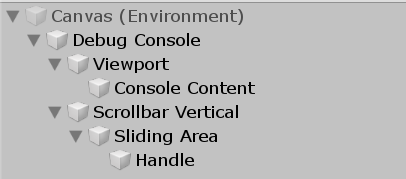
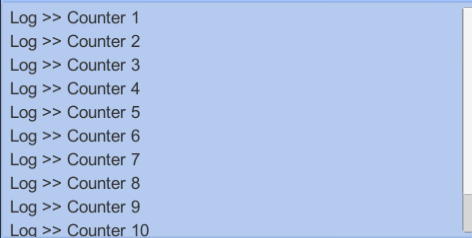
<p>We need a UI in our game to show the game logs, in Unity we can use <code class="language-plaintext highlighter-rouge">ScrollView</code> to solve this. We will add each log into the <code class="language-plaintext highlighter-rouge">Console Content</code> and to make the Vertical Scroll fit with our log list we can use <code class="language-plaintext highlighter-rouge">ContentSizeFitter</code>. In this Console View, I only focus on showing a short log, we can add more features in the future e.g. expand feature to see the detailed log, copy paste and send all the log to somewhere else.</p>

<p><img src="/assets/images/posts/create-in-game-console-for-unity/Untitled.png" alt="Debug Console UI Hierarchy" /></p>

<p>Debug Console UI Hierarchy</p>

<p><img src="/assets/images/posts/create-in-game-console-for-unity/Annotation_2020-06-07_230057.png" alt="Simple Log Console Result" /></p>

<p>Simple Log Console Result</p>

<h1 id="manage-the-gameobject">Manage the GameObject</h1>

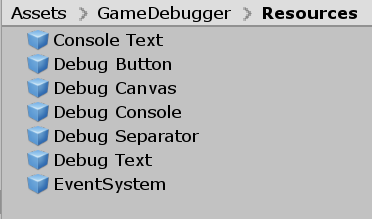
<p>Because we will add some log text to the <code class="language-plaintext highlighter-rouge">ScrollView</code> we make a prefab of the log text so we can reuse it and we do not need to setup it from script. We only need to setup the prefab once and we can use it all the time.</p>

<p><img src="/assets/images/posts/create-in-game-console-for-unity/Prefab.png" alt="Prefab" /></p>

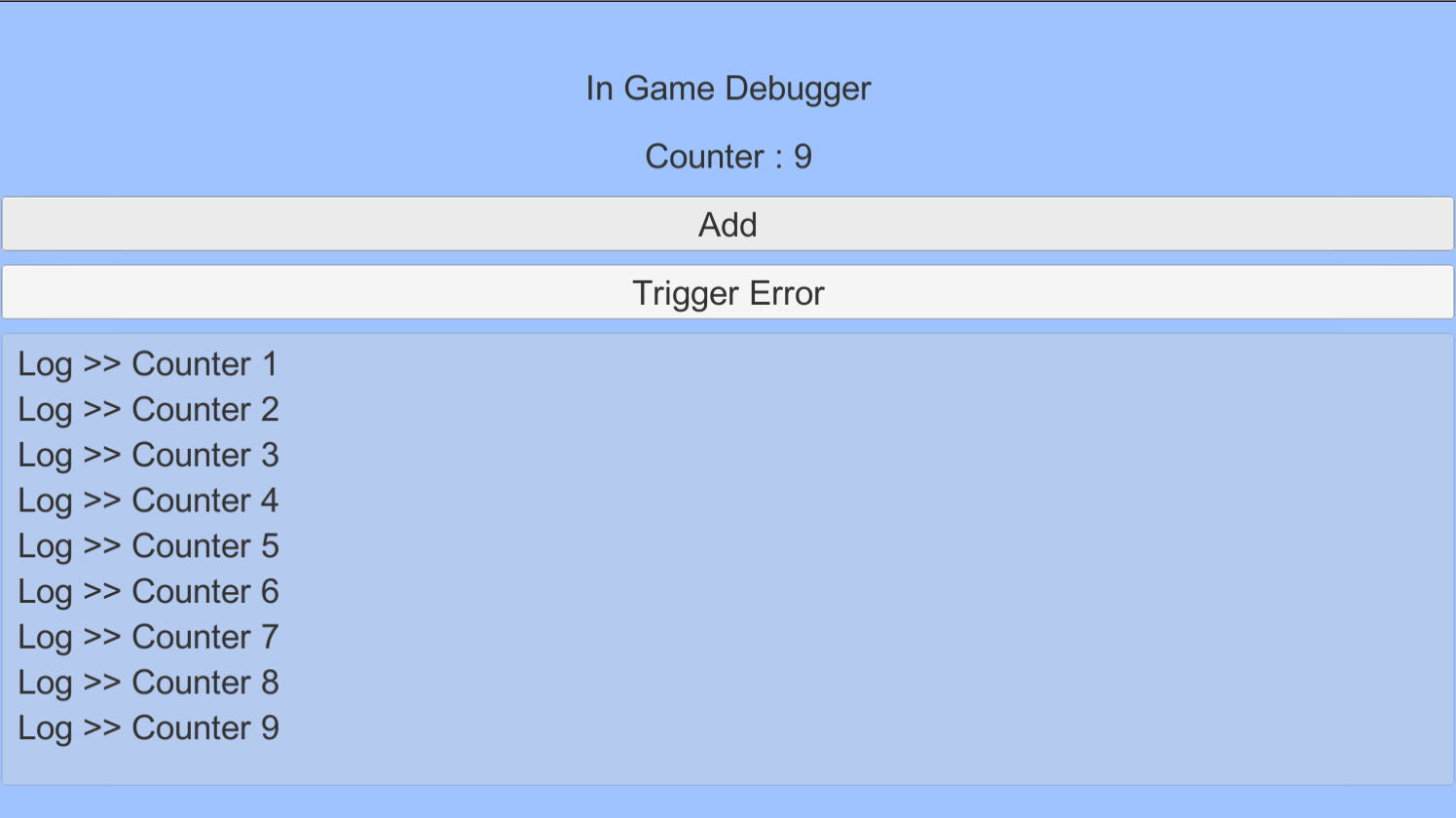
<p>While creating this in-game console, I also created in-game debugger so we can add some button and inspect some value using text. And this console is also a part of the debugger.</p>

<p><img src="/assets/images/posts/create-in-game-console-for-unity/Annotation_2020-06-09_175402.png" alt="Untitled-02" /></p>

<hr />

<p>Thank you for reading my post :) Have a nice day.</p>

<p>You can check the code in <a href="https://github.com/AmdHamdani/Instant-Game-Debugger">github</a></p>]]></content><author><name>A. Hamdani</name></author><category term="tool" /><summary type="html"><![CDATA[When you working on your game, you also want to debug, know the process of your game, take a look at the log you create for that game. It’s easy to take a look at the log in the game engine or…]]></summary></entry></feed>